Agentless Access: Portals and Applications
Agentless Access lets people open internal applications from any browser,
without the XTNA-agent. A portal is one hostname, such as
portal.example.com, served by a gateway asset (a Linux asset running the
XTNA-agent, or the asset container image). Its applications are what the
portal offers under that hostname, each under its own URL path:
- a web application, forwarded to an internal web server,
- a remote desktop (RDP), a terminal (SSH) or a remote screen (VNC) on a machine behind the gateway asset, opened in the browser; see Remote Desktop in the Browser.
The gateway asset terminates HTTPS for the hostname, decides per application what a visitor has to prove, and forwards the request to the application together with the visitor's identity.

People without the XTNA-agent reach the applications from any browser. People with the agent reach the same hostname through the tunnel and are recognised without logging in again, and an application can be limited to them. The applications themselves only ever talk to the gateway asset, so they can stay on an internal network with no public address of their own.
To publish your first portal, follow Publishing a Portal, which walks through every step from the DNS record to the first login.
Supported gateway assets
Portals are served by Linux gateway assets and by the asset container image. Windows, macOS and OpenWrt assets cannot be the gateway asset of a portal yet.
How a request is handled
- The hostname selects the portal.
- The request path selects the application with the longest matching path
prefix.
/requestmatches/requestand/request/form, not/requests. - The application's Trust level is compared with what the request proves (see below). A request that proves more than the application needs is let through; a request that proves less is sent to log in, or refused.
- The request is forwarded to the application's Upstream. Headers added by the gateway asset tell the application who the visitor is.
Trust levels
Levels are ordered from the weakest proof to the strongest. A visitor with a stronger proof satisfies every application below it, so an employee connected through the agent is never asked to log in.
| Level | What the visitor proves | Who the application sees |
|---|---|---|
public |
Nothing. | Nobody. The application does its own checks, if any. |
identity |
A login at your identity provider, with whatever MFA it enforces, by a user a policy grants the portal. | A user of your tenant: id, email and name. |
tunnel |
The request arrived through the XTNA-agent from a device a policy grants the portal, with every condition of that policy met. | The user, plus the device hostname; for a device without a user, the device. |
Access to identity and tunnel applications is granted the way access to
anything else is: by a policy with the portal as its destination.
Without one, only the public applications are open. Allowed user groups on
an application narrow the grant further; they never grant on their own.
Reaching the gateway asset is not reaching the portal. A device that has a
policy for something else on the gateway asset, even for the same port, gets a
page saying that no policy grants it the portal. Reaching a tunnel
application from the public internet shows a page asking to connect with the
client.
A login for an identity application uses your tenant's identity provider,
the same one your users sign in to the client with. A person who logs into a
portal this way becomes a user of your tenant, like a person who signs in to
the client, and is counted the same way.
Identity headers
Every request forwarded to a web application carries these headers. Whatever a visitor sent under the same names is removed first, so the application can trust them as long as it is reachable only through the gateway asset.
| Header | Value |
|---|---|
X-XT-Auth-Level |
public, identity or tunnel |
X-XT-Identity-Kind |
user or peer |
X-XT-Identity-Id |
The user id or the machine id |
X-XT-Email |
The user's email (identity and tunnel) |
X-XT-Name |
The user's name |
X-XT-Device |
The device hostname (tunnel only) |
X-XT-Session-Id |
The browser session (identity only) |
The standard X-Forwarded-For, X-Forwarded-Host and X-Forwarded-Proto
headers are set as well. The Host header is passed through unchanged, so the
application does not need to rewrite its redirects.
Configuration
Portals are created on the Assets page from the Create menu, next to Virtual Asset and Subnet, and from the Create menu of the topology canvas, where they appear as branches of their gateway asset like Virtual Assets. A portal is listed under its gateway asset, and its detail page offers Edit, Sign Out Everyone and Delete.
In the asset table, the Public IP column of a portal shows the gateway
asset's public address and port. The console looks up the hostname in public
DNS and marks the cell with a warning when the hostname does not resolve, when
it resolves to another address, or when the gateway asset does not serve the
portal; the tooltip says which. The lookup is repeated every minute, so a
corrected DNS record shows up without reloading the page, though DNS
resolvers may keep the old answer for the record's TTL. A portal with only
tunnel applications shows Tunnel only instead, because nobody reaches it
from the internet.
The detail page also shows what the gateway asset last reported: whether it serves the portal (and why not, if it cannot), and the certificate state, with the expiry date and issuer of the certificate in use (with a warning when it expires soon), Being issued while an automatic certificate is requested, or the certificate authority's reason when issuance failed (the gateway retries every 15 minutes, and at once when it takes a port over). The report follows every configuration change by a few seconds and repeats every 10 minutes.
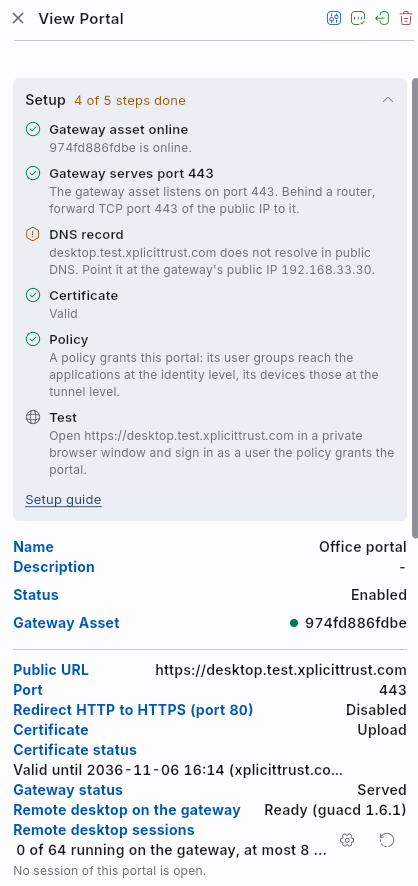
The detail page opens with a Setup checklist built from the same report,
the DNS lookup and the policies: the gateway asset is online, it serves the
portal's port, the hostname resolves to its public IP (left out for a portal
with only tunnel applications), the certificate is valid, and a policy
grants the portal (left out when every application is public). Each step
shows whether it is done, waiting, or what is missing, and the list folds to
Setup Complete once every step is done. A step that needs you, such as a
missing policy while the portal has identity or tunnel applications, is
marked with a warning: those applications are closed to everyone until a
policy grants it.
Before you start
- Point the hostname's public DNS record at the gateway asset's public address. Clients with the agent resolve the hostname to the tunnel address automatically; the public record is for everybody else. An automatic certificate depends on it too: the certificate authority checks the hostname at the address its public record names.
- Make the gateway asset reachable from the internet on the portal's port (443 by default), and on port 80 if you turn on the HTTP redirect. The agent opens these ports in the host firewall it manages; a firewall in front of the asset, and the port mapping of a container, are yours to configure.
- The port must be free on the gateway asset. If a web server on the same host already serves it, for example the reverse proxy the portal replaces, stop that web server: the agent takes the port over within 30 seconds of it becoming free and then requests the certificate. Until then the portal is reported as not served.
- The applications must be reachable from the gateway asset, for example on the same network or the same container host. They need no public address.
General tab
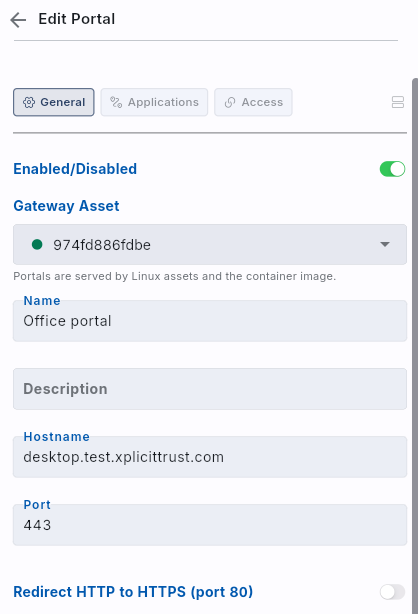
- Enabled/Disabled — toggle to publish or unpublish the portal. A disabled portal is not served.
- Gateway Asset — the Linux asset or container whose agent serves the hostname. It can be changed later: the hostname, the portal's service and every policy on the portal move with it, and both assets pick up the change within seconds.
- Name — a descriptive name for the portal.
- Hostname — the fully qualified name visitors use, for example
portal.example.com. It is unique within your tenant and is also added as a DNS name of the gateway asset. - Port — the port the portal is served on, 443 by default. A host that already serves 443 can use another port; then visitors type the port and the certificate must be uploaded, because automatic certificates are only issued on 443. Port 80 is reserved for the HTTP redirect and cannot be chosen.
- Redirect HTTP to HTTPS (port 80) — also listen on port 80 and send
visitors who typed
http://tohttps://. Off by default; automatic certificates do not need it. - Certificate — Automatic obtains a certificate for the hostname from a public certificate authority on the gateway asset and renews it before it expires. It needs the public DNS record and port 443 reachable from the internet, nothing else. Upload takes a certificate and private key you provide. The key is never shown again and is stored only encrypted for the gateway asset: each gateway asset has a key pair of its own, the private key is encrypted with it the moment you save, and only that gateway asset can decrypt it. Neither XplicitTrust's database nor the gateway's configuration contains it readable. When you edit the portal later, leave the private key field empty to keep the stored key, or paste a new certificate and key together to replace both. To move a portal with an uploaded certificate to another gateway asset, paste the private key again: the stored one is encrypted for the previous gateway asset.
- Session lifetime (hours) — how long a browser login stays valid, 8 hours by default and 24 hours at most. Visitors are sent to the identity provider again when it runs out.
- Description — optional description.
Applications tab
Each application maps a path prefix to an upstream and a trust level. The
longest matching prefix wins; a prefix of / catches everything else. At least
one application is required. Add application opens a new one; choose an
application in the list to change it.
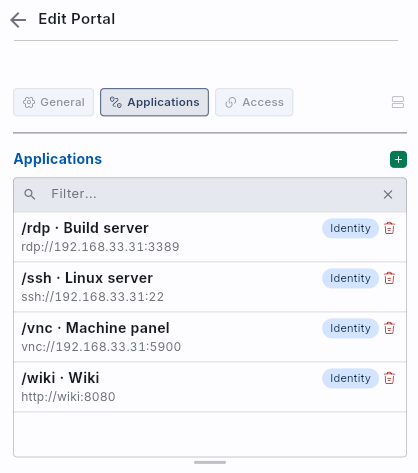
- Name — what people see for the application, for example Wiki or
Finance PC: in the list of applications
and on the page of a remote desktop. At most 64 characters. Without a name,
the list shows the path of a web application (an application at
/goes by the portal's name) and the target of a remote desktop. A Block application has no name, as it is never listed. - Path prefix — must start with
/. Prefixes under/_xtare reserved for the gateway asset's own endpoints. - Upstream — the application's address as seen from the gateway asset, an
absolute
http://orhttps://URL such ashttp://digiapp:8080. Anrdp://host,ssh://hostorvnc://hostupstream opens a remote desktop, a terminal or a remote screen in the browser instead and needs theidentityortunnellevel; see Remote Desktop in the Browser. - Upstream CA certificate — for an
https://upstream, the certificate authority (or the application's own self-signed certificate) to verify it against; empty means the system roots. The host name or IP address in the Upstream URL must also be in the application's certificate: an application whose certificate only names127.0.0.1cannot be verified athttps://192.168.1.20, and visitors see upstream unavailable. There is no option to skip verification; use a certificate that names the address the gateway asset uses, or anhttp://upstream on a network you trust. - Trust level —
public,identityortunnel. - Allowed user groups — for
identityandtunnelapplications, limits the application to members of these groups, on top of the policy that grants the portal. Empty means anyone the policies grant. For a login the check happens when the person comes back from the identity provider; a person outside the groups is refused and sees the reason. A login counts for the application it was started on: a visitor who logged in through an unrestricted application is sent to log in again when entering an application with groups, so that application's groups are checked too. Applications with the same groups share that check. Through the agent the groups of the user logged in on the client count, and a device without a logged-in user, such as a server asset, never passes an application with groups. - Action — Proxy forwards the request (default). Block answers every request under this prefix with 403 without contacting the upstream, which hides an admin area of an otherwise public web application.
- Strip prefix before forwarding — removes the matched prefix before
forwarding, for a web application that expects to be reached at
/. - Allowed networks — one or more networks in CIDR notation, separated by commas, that may use this application from the public internet. Empty means any. Requests arriving through the agent are not affected.
Access tab
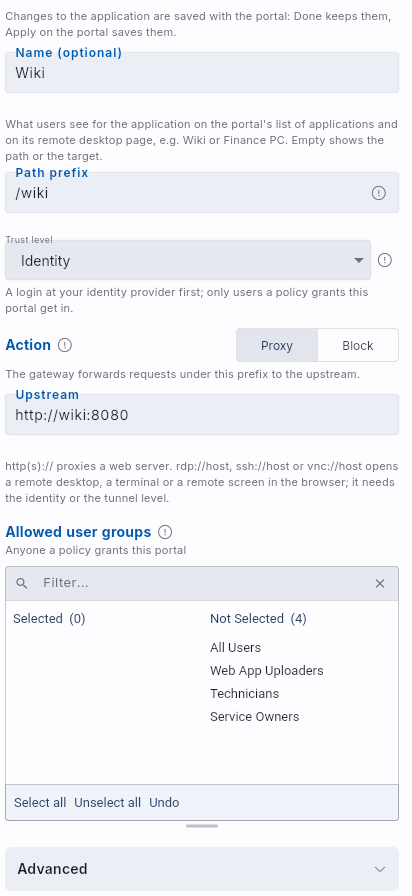
Lists the policies that have the portal as a destination and lets you add
the portal to existing policies, or remove it, without leaving the form.
identity and tunnel applications need such a policy; public applications
work without one. When the portal is saved but could not be added to one of the
selected policies, the console names the policies concerned.
Sign Out Everyone
Sign Out Everyone on the portal's detail page ends every browser session of the portal. The gateway asset picks the change up within seconds; the next request of every signed-in visitor starts a new login. Use it after an application or group change that must apply to people who are already logged in.
Policies
A portal is granted with a policy whose Destination is the portal. A portal destination needs no service: it always means the gateway asset's listener for that portal, and it follows the portal when you move it to another gateway asset or change its port. What the policy grants depends on how the visitor arrives:
| Source of the policy | identity applications, from a browser |
tunnel and identity applications, through the agent |
|---|---|---|
| A user group, or All Users | The users of the group, after their login | The devices those users are logged in on |
| A machine group, an asset or a client | Nobody: a browser login is a person, not a device | Those devices, with or without a logged-in user |
Conditions work as for any other destination, with one difference for
logins: a browser proves no device, so a policy with an OS, location, public
IP or site condition grants the tunnel applications only, never a login.
Time conditions apply to logins too. Changes to a policy reach the gateway
asset within seconds, like any configuration change.
Behind the scenes, saving a portal gives the gateway asset a service named web app (tcp/443) (with the portal's port). A policy with the gateway asset and that service as its destination opens the port, which other services on the asset may share, but grants no portal: a device that comes in that way is shown that no policy grants it the portal.
Users and licensing
A person who signs in to a portal from a browser becomes a user of your tenant at the first sign-in, as with the agent, and needs no device.
- The Activity page lists them in each month they used a portal, as Browser · Office portal where a device's name would be.
- They count as a user for your subscription in each month they used a portal: a monthly invoice includes everyone who was active on a portal during the month it bills, and only that month. A sign-in counts as one hour of activity, a remote desktop, terminal or remote screen in the browser as active until it ends. Someone who also uses the agent counts once.
- While they are active, the Users Online figure of the Dashboard counts them as online.
- A sign-in that no policy grants does not count.
Visitors with the agent pass the portal on their device and are counted through it.
Troubleshooting
| What you see | Cause and fix |
|---|---|
| Gateway status: Not served, "no listener on port 443" | Another process holds the port on the gateway asset. Stop it; the agent takes the port over within 30 seconds. |
| Gateway status: Not served, "the app needs … which this agent version does not support" | The agent on the gateway asset is older than a feature the portal uses. Update the agent. |
| Saving an uploaded certificate fails with "the gateway asset has not reported its encryption key yet" | The private key can only be stored encrypted for the gateway asset, and it has not been online with a current agent version yet. Start or update the agent on it, wait a minute and save again. Automatic certificates do not need it. |
| Gateway status: Not served, "encrypted for another key of the gateway asset" | The gateway asset has a new key pair, because its configuration directory (/etc/XplicitTrust, the volume of the container image) was reset. The private keys uploaded before cannot be decrypted any more: paste the certificate and private key into the portal again. |
| Certificate status: Issuance failed with "no viable challenge type found" | The certificate authority reached something other than the agent on port 443: another web server on the host, or a port forwarding to another machine. Free the port or fix the forwarding; the next attempt follows within 15 minutes, at once when the agent takes the port over. |
| Certificate status: Issuance failed with a DNS or connection error | The hostname's public DNS record does not point at the gateway asset, or port 443 is not reachable from the internet. The asset table's DNS warning shows where the name points. |
| The browser shows upstream unavailable | The gateway asset cannot reach the application's upstream, or cannot verify its certificate. The agent log on the gateway asset names the reason, for example "certificate is valid for 127.0.0.1, not 192.168.1.20"; see Upstream CA certificate above. |
| The browser shows This page needs the client | The application needs the tunnel level and the visitor came from the internet. Connect with the client, or change the application's level. |
| The browser shows No policy grants you this portal | The visitor's device reaches the gateway asset through the agent, but no policy with the portal as its destination includes the device or its logged-in user, or a condition of that policy does not hold. Add the user or device to such a policy; a policy on the gateway asset alone is not enough. |
A login ends with Access denied and no_policy |
No enabled policy with the portal as its destination has a user group of the visitor as its source, or every such policy has a device condition. The event log has a web_app_login_denied event with the reason. |
A login ends with Access denied and not_in_group |
The application allows only certain user groups and the visitor is not in them. |
| Access denied through the agent on an application with user groups | The user logged in on the client is not in the application's groups, or no user is logged in on the device. |
On an Android device with Android 17 or later, the browser does not open the portal while the client is connected (Chrome shows ERR_TOO_MANY_RETRIES); with the client disconnected it opens |
With the client connected, the portal's hostname is the gateway asset's address in the tunnel, and Android counts that address as the local network. From Android 17 on, the browser needs a permission of its own for it; what the client is allowed does not carry over. On the device, open Settings → Apps, choose the browser, then Permissions → Nearby devices, and allow it. The client's My Access page shows a note with a button to that page. |
Events
Portal logins show up in the tenant's event log and reach your SIEM through the event forwarders configured in the tenant settings, like client logins:
| Event | Meaning |
|---|---|
web_app_login_started |
A visitor was sent to the identity provider for an application. |
web_app_login |
The visitor came back and was accepted; the event names the user and the application. |
web_app_login_denied |
The identity provider accepted the visitor but the portal refused them, with the reason: no_policy or not_in_group. |
web_app_sign_out_all |
An administrator ended every browser session of the portal. |
web_app_desktop_session_started |
A remote desktop session opened (details). |
web_app_desktop_session_ended |
A remote desktop session ended, with the reason. |
Creating, changing and deleting a portal is logged as a configuration change, as for every other object.
Example
A process portal under one hostname, where each area needs a different level of trust:
| Path | Purpose | Application settings |
|---|---|---|
/request |
Public request form; the application confirms phone numbers itself | public |
/event |
Appointment planning for external people on their own phones; the application registers the phone itself | public |
/upload |
File upload where every file must be attributable to a person | identity, restricted to a user group |
/workflow |
Internal workflow form, company devices only | tunnel, with a policy on a machine group |
/admin |
The application's own administration | Block |
Two policies grant the portal: one with the employees' user group as its
source, for the logins on /upload, and one with the company devices'
machine group as its source, for /workflow. The public applications need
neither. With names such as Request form and Upload, the identity and
tunnel applications also show up in the portal's list of applications.