Virtual Assets
A Virtual Asset is a device that doesn't have an XTNA-agent running on it, but is made available through a gateway asset (a Linux or Windows asset running the XTNA-agent).
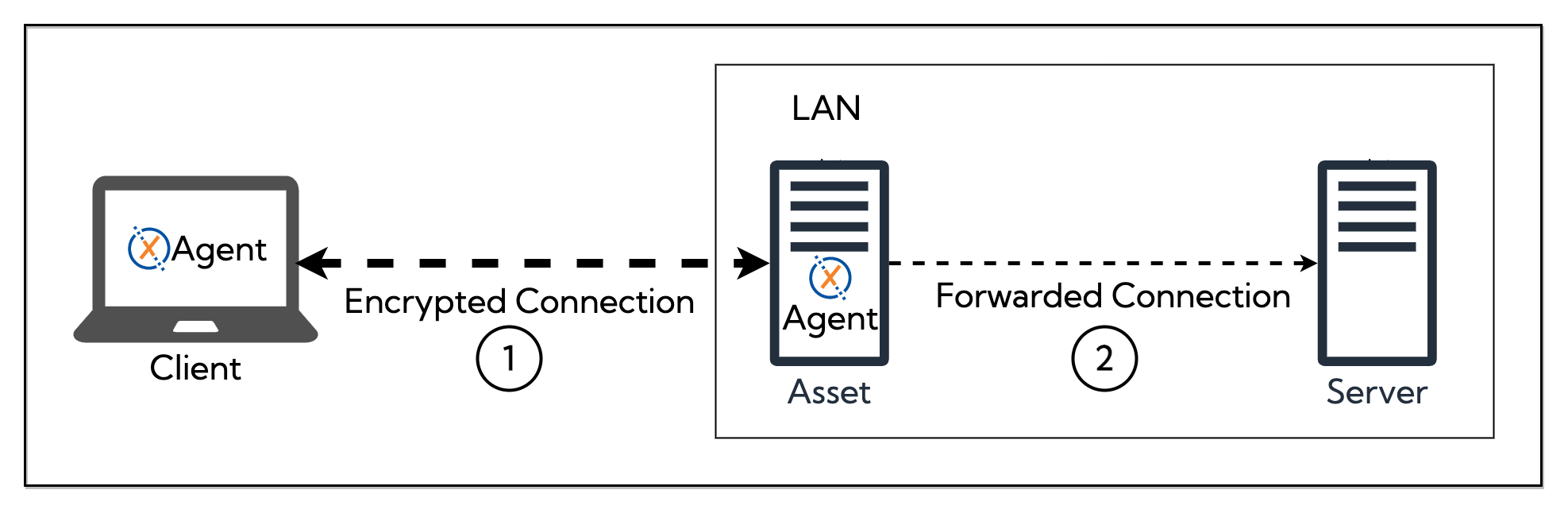
The virtual asset must have an IP that is reachable from the gateway asset (usually on the same local area network).
Access to services provided by a Virtual Asset is granted based on policies.
Typical use cases are devices where you can't install the XTNA-agent but still want to make them available to clients, e.g. printers, NAS, IP cameras, or industrial devices.
Configuration
General tab
- Enabled/Disabled — toggle to enable or disable the virtual asset
- Gateway Asset — the Linux or Windows asset that provides access to this device
- DNS Names — one or more DNS names that clients can use to reach this virtual asset
- Description — optional description
- Tunnel IP — the IP address assigned within the XplicitTrust overlay network (auto-assigned on creation, editable afterwards)
- Resolution Mode — choose how the virtual asset's real address is resolved:
- Static IP — specify a fixed IP address reachable from the gateway asset
- DNS — specify a hostname that the gateway asset resolves dynamically
- Tags — optional tags for organizing and filtering virtual assets
Services tab
- Services — select which service definitions are available on this virtual asset
- Policy Assignments — assign policies that grant access to this virtual asset